
How to Turn Your Browser Sidekick into a High-Speed Email Triage Assistant
The modern corporate inbox is less of a communication tool and more of a digital avalanche. Between multi-departmental threads, automated system alerts, and complex enquiries from clients, it is easy to spend your entire morning just trying to work out who needs what by when.
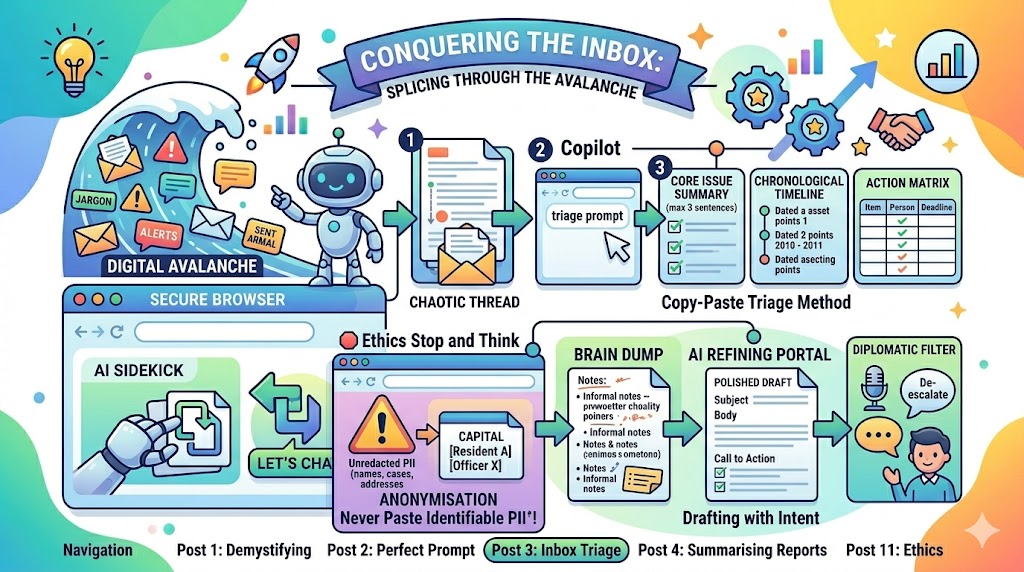
Because direct “AI buttons” aren’t always integrated into standard desktop mail applications, we are going to use our trusted Copy-Paste Sidekick Workflow. By treating your browser-based AI tool as a high-speed administrative assistant, you can slice through email clutter, draft professional replies in seconds, and ensure you never miss a hidden deadline.
The Copy-Paste Triage Method
We have all been copied into that email thread: twenty-five replies long, involving four different departments, filled with corporate jargon, and containing a vague request buried somewhere near the middle.
Instead of spending twenty minutes reading through a messy, reverse-chronological timeline of past conversations, you can use your AI sidekick to triage the text instantly.
Step-by-Step Thread Analysis
-
Open the chaotic email thread in your mail client.
-
Select the entire block of text (from the latest reply right down to the original message) and press Ctrl + C to copy it.
-
Open your secure browser, verify your Protected data shield is visible, and prepare your prompt.
-
Paste the text below your prompt structure using Ctrl + V.
To make this work beautifully, use a CRAFT prompt designed specifically to extract clarity from chaos.
The Triage Prompt Template
[Context] I am a corporate professional who has just been looped into a long, complex internal email thread regarding a project update.
[Role] Act as a highly organised Executive Assistant.
[Action] Analyse the copied email thread pasted below. Extract a clear, chronological timeline of events, summarise the core argument or issue being discussed, and list any outstanding actions.
[Format] Present the output in three distinct sections: 1. Core Issue Summary (max 3 sentences), 2. Chronological Timeline, and 3. Action Matrix (a Markdown table with columns for Action Item, Person Responsible, and Implied Deadline).
[Tone] Objective, factual, and direct.
Here is the email thread: [Paste your copied email text here]
Unpacking Thread Chaos: A Workplace Example
Imagine you copy a chaotic internal thread containing the following messages:
-
From: Sarah (Finance) – Tuesday 10:14 AM: “We can’t sign off on the project printing costs until Dave sends the revised quote. If we don’t get this by Friday at 4pm, the budget allocation rolls over to Q3, which delays the whole launch. Dave, did you speak to the printers?”
-
From: Dave (Operations) – Tuesday 9:30 AM: “Spoke to the printer group last week, they said costs went up 5% due to paper supply issues. I told them we might have to scale back the brochure size. Sarah, I thought we had a contingency fund for this? I’m out of the office on Wednesday at a training event.”
-
From: John (Project Lead) – Monday 4:15 PM: “Hi all, we need to finalise the launch materials ASAP. Finance needs the numbers. Dave, can you chase the printers? Sarah, can you check if there’s any flex in the main budget? Thanks.”
After running the triage prompt, the AI strips away the conversational noise and hands you this clean breakdown:
1. Core Issue Summary
The launch of the project materials is at risk due to an unconfirmed 5% increase in printing costs. If a revised quote is not signed off by Friday at 4:00 PM, funding will be delayed until the next quarter.
2. Chronological Timeline
-
Monday 4:15 PM: John requests a budget review from Sarah and a printing update from Dave.
-
Tuesday 9:30 AM: Dave reports a 5% cost increase and suggests scaling back brochure sizes. Notes he is out of office on Wednesday.
-
Tuesday 10:14 AM: Sarah states no sign-off can occur without the revised quote and sets a hard deadline for Friday at 4:00 PM.
3. Action Matrix
💡 Top Hint: When copying email threads, quickly delete automated corporate signature blocks and disclaimer text before hitting enter. It saves space and stops the AI from wasting time analysing useless privacy policy small print.
Drafting with Intent: The “Brain Dump” Transformation
The hardest part of writing an email is moving from your internal “brain dump” (what you actually want to say) to a structured, professional piece of corporate communication.
Instead of agonising over the perfect wording, write your rough, messy thoughts down in rapid bullet points, and let the AI handle the heavy lifting of polishing the prose.
The Draft Prompt
[Context] I need to email a department head to remind them that their team has missed the deadline to submit their corporate compliance returns.
[Role] Act as an expert Corporate Operations Advisor.
[Action] Transform my rough, informal notes pasted below into a professional, clear, and structured email.
[Format] A standard internal email format (Subject Line, Salutation, Body, Call to Action).
[Tone] Professional, polite, yet firm about the operational impact of the delay.
Here are my rough notes: “Bob’s team is late again with their compliance logs. Was due last Friday. It’s messing up our corporate completion statistics which we have to show to the executive board next week. I need them by Thursday lunchtime otherwise his department will show up as red on the dashboard.”
The Polished Output
The browser sidekick returns a draft ready for you to quickly review, customize, and send:
Subject: Urgent: Outstanding Corporate Compliance Returns – Action Required
Hi Bob,
I hope you are well.
I am writing to drop you a quick reminder regarding the corporate compliance logs for your department, which were due for submission last Friday.
We are currently preparing our organisation-wide completion statistics for presentation to the Executive Board next week. To ensure your department’s progress is accurately reflected and to prevent any gaps from showing on the corporate dashboard, we need to finalise these figures.
Could you please ensure your team’s completed returns are forwarded to us by Thursday at 12:00 PM?
Thank you for your support with this. Please let me know if your team needs any assistance completing the logs.
Best regards,
[Your Name]
The Diplomatic Tone Check
In the modern workplace, written communication is a permanent matter of record. An email sent in a fleeting moment of frustration can cause weeks of friction or lead to internal HR escalations. Before hitting send on an email that feels a bit too sharp, use your AI sidekick as a Diplomatic Filter.
The “De-escalation” Technique
If you have written a draft response to a difficult client complaint or a frustrating contractor, copy your draft into the browser and ask:
“Act as a corporate communications diplomat. Review my draft email below. Identify any phrases that sound defensive, passive-aggressive, or overly bureaucratic. Rewrite the email to ensure it is constructive, objective, and entirely solution-oriented, while still maintaining our organizational boundaries.”
The AI will highlight where your phrasing might cause unnecessary friction and offer a neutral, calm alternative that keeps the business relationship moving forward productively.
🛑 Ethics “Stop and Think”: The Data Red Line
While corporate logins provide crucial encryption and data protection walls, standard data privacy principles dictate an absolute boundary.
🚨 The Rule: Never copy and paste identifiable customer, client, or employee personal data into a web browser AI.
If a client sends a long, emotionally charged email detailing private account disputes, sensitive financial struggles, or medical histories, you cannot copy and paste that text verbatim into a web browser tool.
How to comply safely: Before copying text out of your email client, you must anonymise it. Replace real names with generic placeholders like [Client A], delete specific street addresses, remove invoice or reference numbers, and strip out highly sensitive personal details. Keep the core logic of the business problem, but completely delete the identity of the person.
📋 The Inbox Toolkit
-
Triage: The process of quickly sorting through large volumes of information or communication to prioritise the most critical items.
-
Brain Dump: Writing out raw, unformatted, and informal thoughts quickly before organising them into a final structure.
-
Diplomatic Filter: Using AI to analyse a text draft for emotional bias, defensiveness, or confrontational language, and replacing it with objective, constructive phrasing.
-
Anonymisation: The mandatory process of removing personally identifiable information (PII) from a document before processing it through an external assistant.
This is the latest entry in our ongoing series on maximizing workplace productivity with AI. In our next post, we will explore methods for summarizing massive corporate reports without losing the crucial details.