
How Professionals Are Reclaiming Their Workday by Mastering the “Copy-Paste Sidekick Workflow”
The modern workplace is facing an invisible crisis: administrative fog. Between endless email threads, data management, and the constant pressure to draft flawless communications, professionals are losing hours to formatting and phrasing.
While the tech world continues to debate the long-term future of Artificial Intelligence, a quiet revolution is happening right inside standard web browsers. Workers are bypassing complex software installations and leveraging free, web-based tools to instantly clear their desks of routine administrative tasks—allowing them to focus heavily on strategy, creativity, and human connection.
Meet the Tech: The Browser-Based Sidekick
For most professionals, the biggest barrier to adopting AI isn’t capability—it’s access. Fortunately, one of the most powerful corporate tools available requires no IT installation requests or premium subscriptions. The free web-based version of Microsoft Copilot is accessible right now through standard browsers like Microsoft Edge or Google Chrome.
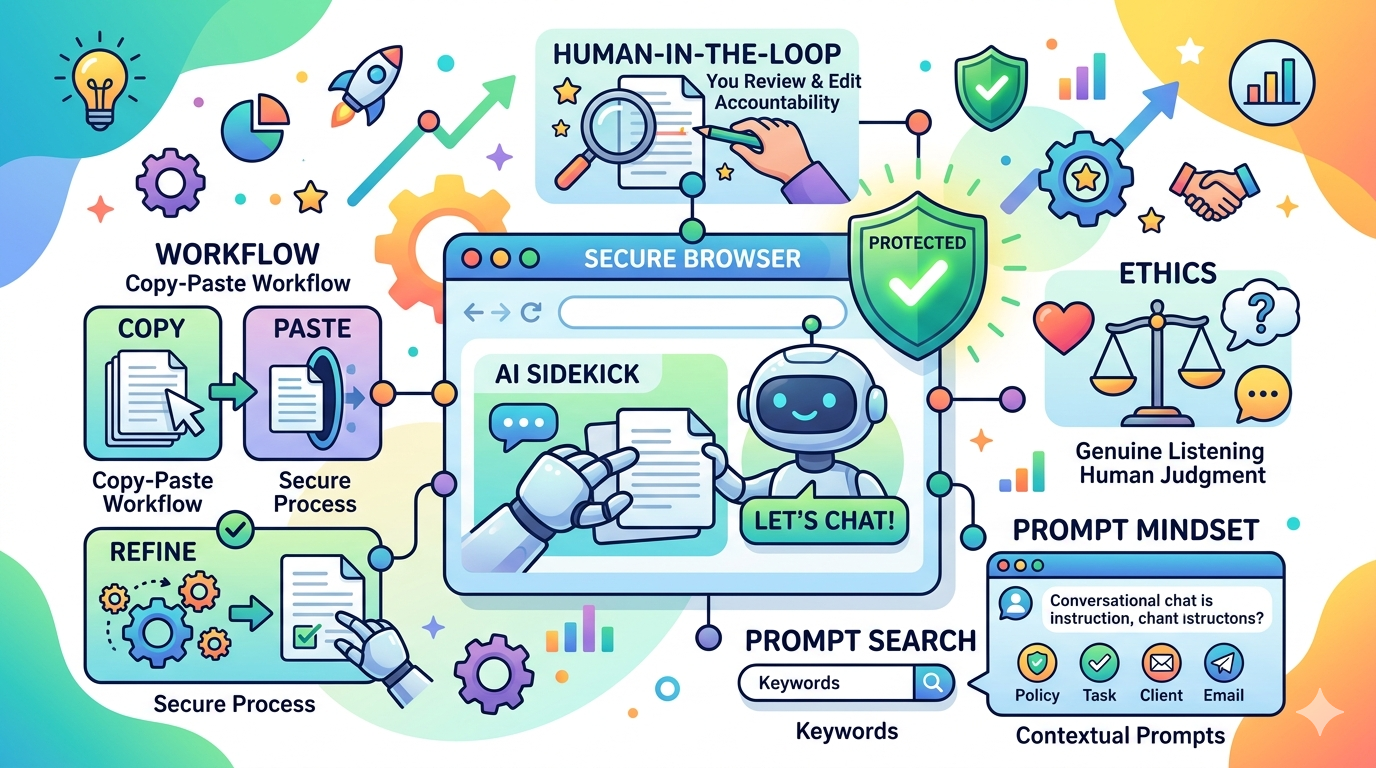
Rather than treating AI as an automated machine making independent decisions, savvy professionals view it as an exceptionally fast administrative assistant. Because direct integration buttons aren’t always available inside standard desktop applications, a highly effective, deliberate method called the Copy-Paste Sidekick Workflow has emerged:
-
Extract: Copy text directly from a work document, report draft, or email thread.
-
Instruct: Paste it into the secure browser window alongside specific, clear directions.
-
Refine: Tweak, polish, and iterate on the AI’s response in real-time.
-
Deploy: Copy the perfected text back into local desktop applications.
The Corporate Shield: Why the “Protected” Icon is Non-Negotiable
As AI adoption skyrockets, corporate data security has become a primary headline. The golden rule of using public AI tools at work is simple: never upload sensitive or proprietary company data into a standard public interface. Doing so risks adding confidential text to a public pool used to train future models.
However, a major security safety net exists for corporate users. When accessing web-based Copilot, logging in with official corporate credentials often unlocks a crucial state: Commercial Data Protection.
🛡️ Security Check: Look for the green or blue "Protected" shield at the top of the screen before typing.
When this status is active, a secure digital wall is thrown around the conversation. Data is fully encrypted, it is never saved or reviewed by human eyes, and it is strictly banned from being used for AI training. For professionals dealing with day-to-day operations, ensuring this “Protected” icon is visible has become an essential morning habit.
The Golden Rule: Keeping a Human in the Loop
Despite the remarkable speed of Large Language Models, industry experts universally warn against blind reliance. This has led to the industry-standard principle known as Human-in-the-Loop (HITL).
While a browser sidekick can generate a beautifully structured report in seconds, it lacks lived professional experience, corporate common sense, and accountability. It cannot sense the subtle politics of an internal team, it cannot feel genuine empathy for a client, and it does not care if a data point is inaccurate.
Professionals retain absolute accountability for every piece of data leaving their desks. If an AI confidently fabricates a fact—a phenomenon known as a “hallucination”—the ultimate responsibility falls entirely on the human professional who signed off on it.
Shifting Focus: Breaking the “Google Search Habit”
The biggest hurdle for corporate beginners is a psychological one: breaking a decades-old internet habit.
When searching the web, professionals are trained to use short, blunt keywords. However, treating a modern AI tool like a search engine yields generic, robotic, and unhelpful results. The true shift happens when moving into an AI Prompting Mindset, switching from keyword searching to conversational instructions.
By treating the tool as a literal-minded colleague who thrives on context and clarity, professionals are completely eliminating the anxiety of the blank page.
🛑 The Ethical Line: Efficiency vs. Genuine Engagement
The rise of AI brings a critical ethical question to the forefront of corporate culture: Are we using technology to manage the volume of work, or are we using it to avoid genuine listening?
Consider a project manager tasked with reviewing hundreds of pieces of detailed client feedback. Pasting the text into a browser window and asking for “the top three complaints” provides clean, actionable data points in a matter of seconds. It feels like an undeniable victory for productivity.
However, industry experts urge caution. A sterile summary can easily strip away the emotional weight and nuance of a client’s lived experience. The consensus among top professionals is clear: AI should be deployed to clear administrative clutter, structure thoughts, and refine grammar—but it must never replace authentic human connection and deep attention to detail.
📋 The Workplace AI Glossary
-
Browser-Based Sidekick: An AI tool accessed directly through a web browser, functioning as a real-time conversational partner without needing software downloads.
-
Commercial Data Protection (Protected Status): A corporate security protocol ensuring all inputs are encrypted, kept strictly confidential, and never used to train external models.
-
Copy-Paste Sidekick Workflow: The deliberate process of moving text between local desktop apps and a secure browser interface to process information safely.
-
Human-in-the-Loop (HITL): The mandatory practice of human oversight, ensuring every AI output is checked, validated, and owned by a person before final deployment.
-
Hallucination: A technical phenomenon where an AI system generates incorrect, inaccurate, or fabricated information but presents it with total confidence.
This is the first post in a mini series exploring the practical integration of AI in the modern workplace. In our next piece, we will break down the exact anatomy of a perfect corporate prompt.