
How to Co-Author Complex Corporate Documents without Losing Your Human Edge
Up to this point, you have used your browser-based AI sidekick to handle quick wins—short emails, rapid messaging tidy-ups, and basic text transformations. Now, it is time to step into intermediate territory. We are going to scale up our operations from short, snappy messages to heavy, long-form corporate documents like project reports, strategy updates,and business cases.
Because we are working within the trusted Copy-Paste Sidekick Workflow, we cannot simply click an “insert” button inside Microsoft Word just yet. Instead, we must learn to treat the browser chat window as a secure, digital drafting table where we co-author, stress-test, and refine complex content layer by layer before pasting the polished results back into our local files.
Prompt Scaffolding: Building Complex Documents Layer by Layer
When faced with writing a massive, thirty-page policy review or a detailed business case, the corporate temptation is to write one colossal, multi-paragraph prompt containing all your scattered notes, stringent rules, raw data, and precise formatting requests, hit enter, and hope for a miracle.
This approach almost always leads to a technical failure called AI Overwhelm. When you give an AI tool too many intricate instructions at once, it tends to drop constraints, completely forget the middle sections of your prompt, or default to generic corporate filler text.
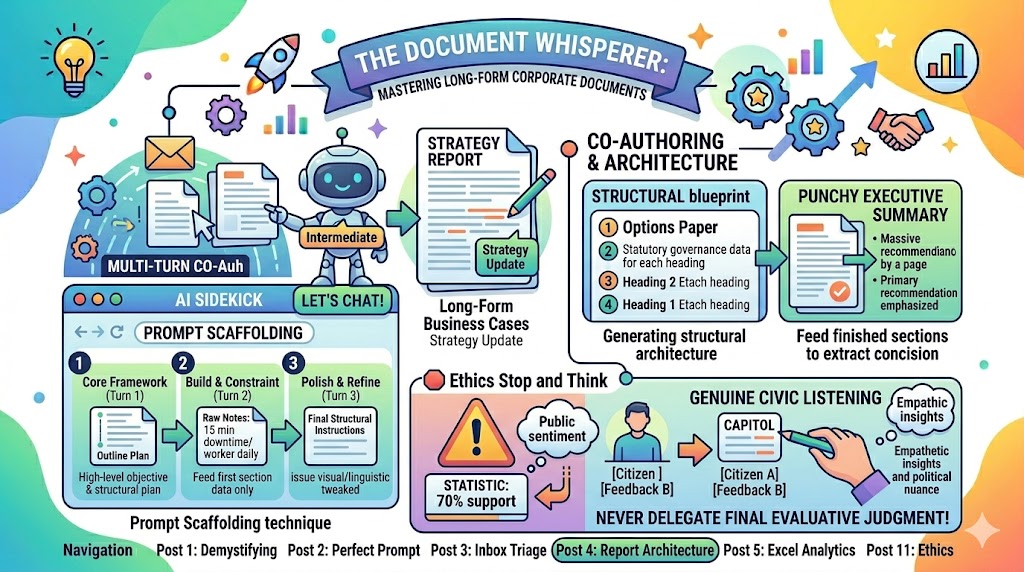
To bypass this limitation, we use a sophisticated technique called Prompt Scaffolding. Just like physical scaffolding supports a massive building as it is constructed tier by tier, prompt scaffolding allows you to co-create complex documents by stacking instructions sequentially across multiple conversational turns.
By breaking the writing process down into these manageable, deliberate phases, you maintain complete, granular control over the quality, structure, and accuracy of each section.
Co-Authoring and Report Architecture
Writing reports for executive boards or senior leadership teams can be exceptionally tedious because of the strict, non-negotiable structural standards required. Copilot is an excellent, dynamic tool for generating the precise structural blueprint of these documents before you ever start typing.
Generating a Structural Outline
If you are struggling to map out a complex argument or options paper, use the AI to establish the structural architecture.
CRAFT Outline Prompt: [Context] Our organisation needs to submit an options paper to the executive board regarding a proposed strategic partnership with an external vendor for digital services.
[Role] Act as a Senior Corporate Governance Officer.
[Action] Create a comprehensive structural layout and section outline for this board report.
[Format] Format this as a numbered list of headings with brief descriptions of what evidence or data must be included under each heading to meet standard governance audit trails.
[Tone] Formal, objective, and legally structured.
Creating Punchy Executive Summaries
The executive summary is often the most critical part of any business document—it is the only section busy elected board members or directors may read fully. However, condensing a detailed 30-page draft down to a single, powerful page is incredibly difficult.
Using the copy-paste method, you can feed completed sections of your document into the AI browser to extract a concise, high-impact summary.
Executive Summary Prompt: “I am going to paste the three main sections of our department’s annual workforce development report below. Read through the text, extract the three most critical operational impacts, and draft a high-level Executive Summary suitable for presentation to the Chief Executive. It must be a maximum of 200 words and lead with the primary recommendation.”
Policy Review and Devil’s Advocacy
As corporate professionals, our documents are subject to heavy external scrutiny from auditors, clients, and regulators.A single contradiction in a public-facing policy or a weak assumption in a business case can derail an entire project.You can use your browser sidekick as a secure, internal critical friend to stress-test your work before submission.
Scanning for Clarity Gaps and Contradictions
Paste your draft text into the browser and ask for a detailed review for internal inconsistencies:
“Act as an unbiased corporate policy analyst. Review our draft flexible working policy pasted below. Scan the text specifically for any contradictions regarding core working hours, find any ambiguous vocabulary that could confuse staff, and list any operational clarity gaps.”
The Devil’s Advocate Technique
To ensure your argument is absolutely bulletproof, challenge the AI to take on the perspective of a highly skeptical reader. This helps you anticipate critical objections before you walk into a board meeting.
Transforming Rough Minutes into Action Tables
We have all been tasked with taking the minutes for a fast-paced, high-stakes internal meeting. You end up with pages of messy, fragmented bullet points, side-conversations, and half-formed thoughts. Turning that raw text into a clean action list for follow-up can take hours of administrative time.
This is where the Copy-Paste Sidekick Workflow shines. You can paste your unformatted notes directly into the browser and let it handle the heavy administrative restructuring.
Worked Example: Turning Notes into Structure
You copy the following messy narrative from your scratchpad:
“Meeting started late. Talked about the new apprenticeship intake. Jane says induction day is set for Sept 5th but HR hasn’t sent the welcome packs. Tom needs to chase HR about that by next Tuesday otherwise we miss the printing deadline. Also, we need to book the main conference room for the morning session. Jane will handle the booking this week. Bob mentioned budget is tight, need to limit catering to just tea and biscuits, no lunch. Tom will confirm final numbers with the catering team once HR approves the list.”
The Copilot Restructuring Prompt
“Act as a highly efficient administrative officer. Clean up my raw, informal meeting notes pasted below. Extract all formal decisions made and organize the outstanding tasks into a structured action table. The table must have columns for: Task Description, Assigned Owner, and Target Deadline. Ensure the language is formal, professional, and uses UK spelling.”
The Polished Output
The AI instantly transforms the chaotic narrative into a neat structure you can drop straight into a follow-up email or local Word document:
Decisions Made:
-
The apprenticeship induction day is officially scheduled for the morning of 5th September.
-
Catering for the induction event will be restricted to light refreshments (tea, coffee, and biscuits); no formal lunch will be provided due to budgetary constraints.
Action Matrix:
🛑 Ethics “Stop and Think”: The Illusion of Analysis
Imagine you are reviewing twenty complex consultation feedback forms submitted by corporate clients regarding a proposed change in service terms. It is 4:45 PM on a Thursday. You paste all twenty forms into Copilot and say: “Tell me if the clients generally support or oppose this change.”
The AI reads the text in a millisecond and replies: “Based on the text, 70% of respondents express positive alignment with the service changes.” You type that statistic into your report, save it, and log off.
Stop and Think: AI tools completely lack common sense, corporate empathy, or a nuanced understanding of client dynamics. It might have classified a client’s heavily qualified, highly conditional support (e.g., “I support this only if our specific service level agreement remains unchanged”) as a simple, unconditional “positive alignment.“
By completely outsourcing the analysis of client sentiment to an automated language generator, are you bypassing your professional duty to understand the genuine anxieties and needs of your corporate network?
The Ethical Boundary: Use the browser sidekick to clean text, sort actions, or summarise long documents, but neverdelegate the final evaluative judgment or political analysis to a machine. The data processing can be automated, but the actual thinking must remain entirely human.
This is the latest entry in our series on maximizing workplace productivity with AI. In our next post, we will move from text to data, showing you how to turn your browser sidekick into a secure Excel analytics expert.