
Navigating the Safety Boundaries of Local Government AI
Every time you get behind the wheel of a council fleet vehicle, you know there are absolute rules you must follow to keep yourself, your passengers, and the public safe. You do not speed, you check your mirrors, and you respect the red lights.
Using artificial intelligence in local government follows the exact same logic. Copilot is an exceptionally powerful engine, but if you drive it without understanding where the safety boundaries are, you risk crashing into massive data protection breaches, spreading public misinformation, or eroding the civic trust that holds our community together.
Because we use the free web version of Copilot, we do not have automated corporate filters built into our desktop applications to stop us from making mistakes. We must manage our own safety. This outlines the three non-negotiable rules of the game: protecting public data, hunting down hallucinations, and maintaining your authentic human voice.
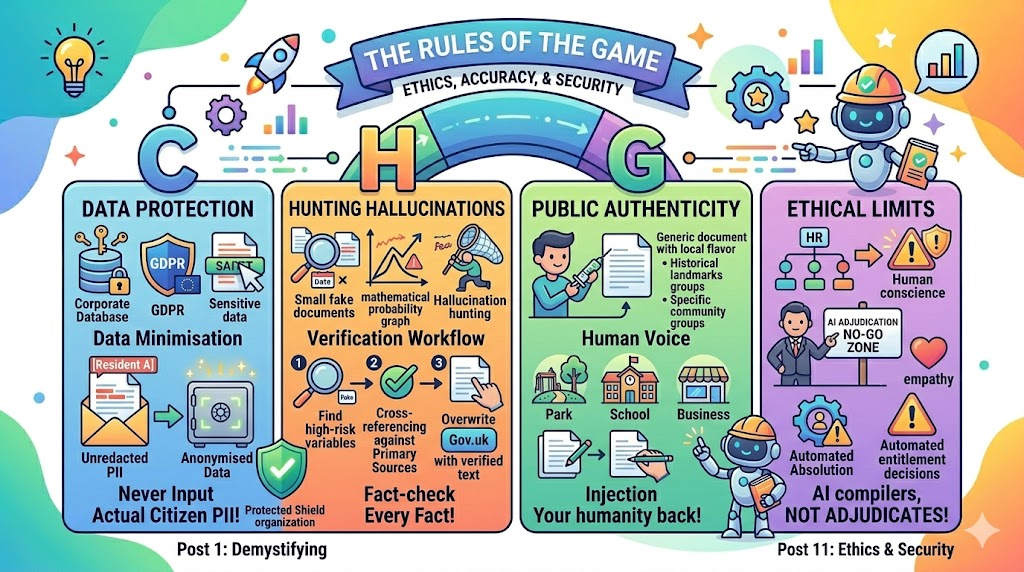
Data Protection, GDPR, and Redaction
Let us establish the absolute, non-negotiable red line of public sector prompt engineering: Never input actual citizen names, home addresses, dates of birth, case reference numbers, health details, or restricted financial data into a web browser AI tool.
To understand why this is a red line, we need to look closely at how our council’s security framework operates.
The Two Layers of Data Protection
In our initial discussion, you learned to look for the blue or green “Protected” shield in the top corner of your browser.This shield is fantastic: it prevents Microsoft from looking at your prompts or using your text to train future public versions of the AI.
However, the “Protected” status is an organisational confidentiality wall, not a blanket authorization to bypass UK GDPR and the Data Protection Act 2018.
Our local authority holds highly sensitive public records under strict legal frameworks. Our IT security teams have audited and approved internal systems (like our core housing databases or social care software) to hold that data safely.They have not approved external browser text boxes to act as storage vaults for individual resident files. Pasting unredacted citizen histories into a web browser—even a corporate-logged one—violates the core GDPR principle of Data Minimisation (only sharing the absolute minimum data required to perform a specific task).
The Redaction Workflow
Before you use the Copy-Paste Sidekick Workflow to summarize a long complaint, draft an appeal response, or triage an email, you must manually strip out all Personally Identifiable Information (PII).
💡 Top Hint: When anonymising text, use explicit capitalised placeholders inside brackets like [Resident A], [Officer X], or [Date]. This allows Copilot to maintain the narrative logic of your sentence without losing track of who did what.
Spotting and Correcting Hallucinations
To use AI safely, you must understand a fundamental truth about how Large Language Models work: Copilot is a language prediction engine, not a fact database.
When you type a prompt, Copilot does not look up an internal encyclopedia to find the truth. Instead, it calculates a mathematical probability game. It looks at your words and asks itself: Based on everything I have ever read on the internet, what is the most statistically likely word that should come next in this sentence?
Most of the time, this word-guessing game looks like magic. But occasionally, the math miscalculates, and the AI confidently invents entirely fictional facts, false statutory dates, or non-existent legal case laws. This is known as a Hallucination.
Why AI Lies Confidently
The most dangerous thing about a hallucination is that it never looks like a lie. Copilot will never say: “I think the deadline might be next Tuesday, but I am guessing.” It will say: “Under Section 42 of the Local Government Act 2024, the mandatory deadline is strictly next Tuesday.” It will use a formal, authoritative, and completely convincing tone while being entirely wrong.
To protect public accountability, you must establish a systematic Hallucination Hunting Workflow for every single piece of text generated by an AI.
① Step 1: Isolate high-risk variables (Isolation)
Scan the generated text in your browser window. Highlight every single statistic, percentage, calendar date, legal reference, website link, or named organisation. These are your high-risk variables.
② Step 2: Apply the Null Hypothesis (Skepticism)
Assume every highlighted variable is completely invented until you can prove otherwise. Never copy the text into a live council document while it is in this unverified state.
③ Step 3: Cross-reference against primary sources (Verification)
Open a separate browser tab and manually verify each variable against an official Primary Source. Check statistics against internal finance databases; check legal rules against Gov.uk or official democratic service portals.
④ Step 4: Manually overwrite the text (Correction)
Once you copy the text layout into your local Microsoft Word file, manually type the verified facts over any errors. If a website link generated by the AI leads to a “404 Page Not Found” error, delete it and replace it with a genuine URL.
Intellectual Property and Public Authenticity
There is a growing corporate risk in the public sector of creating what experts call the “Vanilla Council.” This happens when staff use AI so heavily that every strategy document, newsletter, and internal briefing note begins to sound exactly the same—a sterile, overly polished, bland wall of text filled with generic corporate platitudes.
As local government officers, our authority stems from our local knowledge, our democratic accountability, and our authentic human connection to our specific geographic area.
Balancing Efficiency with Authenticity
Use your browser-based sidekick to clear the administrative fog: let it format tables, fix grammar, shorten lengthy notes, or brainstorm structural outlines.
But when it comes to the final voice of a public-facing document, inject your own humanity back into the text.
-
Ground it locally: Ensure your text mentions specific local neighborhoods, historical landmarks, or distinct community groups rather than generic “stakeholders.“
-
Keep it human: If a policy affects vulnerable people, review the AI text to ensure it sounds compassionate,empathetic, and warm. AI cannot feel empathy; only you can.
-
Own the final edit: Think of Copilot as a tool that gets you 70% of the way across the finish line. The final 30%—the nuance, the political awareness, the local cultural sensitivity—must be written entirely by your own hand.
🛑 Ethics “Stop and Think”: The Danger of Automated Absolution
Imagine you are an HR advisor dealing with a difficult internal grading appeal from an employee. The case is complex and emotionally charged. Pressed for time, you paste an anonymised summary of the employee’s grievance arguments into Copilot and ask: “Based on council guidelines, does this employee have a valid case for a grade increase?”
The AI reviews the text and responds: “Based on the structural data provided, the employee’s current responsibilities align tightly with their existing grade. The appeal should be declined.”
Relieved, you copy this reasoning into your final report, sign your name at the bottom, and close the file. If the employee complains, you tell yourself: “Well, the analytical tool verified that the grading was fair.”
Stop and Think: By relying blindly on the AI’s conclusion, have you committed the ethical error of Automated Absolution? Are you using technology as a moral shield to protect yourself from the emotional discomfort of making a difficult human decision?
Copilot can match keywords, but it cannot understand the invisible context: the employee’s unique dedication, the unspoken historical team structural shifts, or the human impact of a rejected appeal.
The Ethical Boundary: AI must only ever be used to compile information or clarify layout. It must never be used to adjudicate human value, grade human careers, or decide resident entitlements. You cannot delegate your professional conscience to a browser box. The decision must be entirely yours to defend.
📋 Toolkit: The Rules of the Game
Before you next generate some text, let’s lock in the non-negotiable terminology:
-
Personally Identifiable Information (PII): Any piece of data that can be used on its own or alongside other information to identify, contact, or locate a specific individual.
-
Data Minimisation: A fundamental statutory principle of UK GDPR stating that personal data collected and processed must be limited entirely to what is necessary for the task.
-
Anonymisation: The process of permanently removing or substituting identifying elements from a text block so that the underlying individual remains completely unrecognizable.
-
Hallucination: A structural error where an AI model generates factually incorrect information, fake references,or false data but delivers it with absolute confidence.
-
Primary Source: An original, authoritative, and direct repository of verified truth, such as a statutory government website (Gov.uk) or a council’s audited finance system.