
Moving Beyond Vague Prompts: Why Your Browser Sidekick Needs a Better Brief
Now that you have logged in, verified your “Protected” security status shield, and embraced the role of a human supervisor, it is time to learn how to speak fluent “AI”.
A common complaint among professionals trying artificial intelligence for the first time is that the output feels clinical, generic, or just a bit off. The reality? If you ask a vague question, you will get a vague, corporate-flavoured wall of text.
To get high-quality, highly precise assistance from your browser-based sidekick, you need to structure your instructions. Think of it like writing a clear delegation brief for a new temporary administrator: the better the brief, the better the work they return to you.
The CRAFT Framework: Your Five-Step Prompt Blueprint
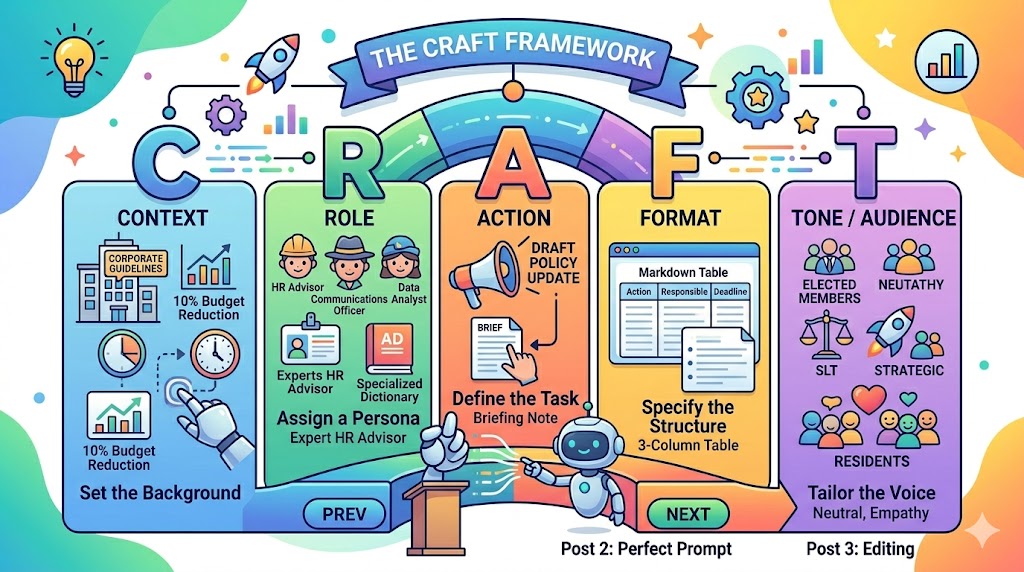
In the corporate world, structure is everything. To build the perfect prompt, top productivity experts rely on the CRAFT Framework. It is a simple, five-part blueprint that ensures you give your AI assistant all the necessary ingredients to cook up an excellent response.
-
C – Context: Set the background. What is the situation? What are the constraints?
-
R – Role: Assign a persona. Who is the AI pretending to be?
-
A – Action: Define the specific task. What exactly do you want it to produce?
-
F – Format: Specify the structure. How should the output look on the page?
-
T – Tone / Target Audience: Tailor the voice. Who is going to read this, and how should it make them feel?
Let us break these five components down into practical workplace applications.
C – Context
AI has no idea what department you work in or what pressures your team is under unless you tell it. Context grounds the AI in reality.
-
Example: “Our customer success department is facing a 10% budget reduction under new corporate guidelines, and we need to change how we communicate processing delays to clients.”
R – Role
By telling the AI to act as a specific expert, you unlock its specialized language patterns and industry-specific frameworks.
-
Example: “Act as an expert corporate HR Advisor” or “Act as an experienced Public Relations Communications Officer.”
A – Action
Be direct and use clear command verbs. Avoid being overly polite or ambiguous. Tell the system precisely what to do.
-
Example: “Draft an internal communication briefing note for team leaders regarding the new flexi-time policy updates.”
F – Format
Because you are using the Copy-Paste Sidekick Workflow, think about how you want the text to look when you paste it back into your local documents or emails. Do you want bullet points, a three-paragraph summary, or a structured table?
-
Example: “Provide this as a Markdown table with three columns: Action, Responsible Team, and Deadline.”
T – Tone / Target Audience
A letter to an executive board member needs a completely different feel to an internal instant message sent to a close colleague. Define your reader and the emotional boundary.
-
Example: “Write this with an empathetic yet legally compliant tone for internal staff who may be anxious about these operational changes.”
Case Study: The “Google-Style” Prompt vs. CRAFT
Let us look at a real-world scenario where a project manager needs to inform a local business community about upcoming, disruptive utility works on a commercial street.
The Bad “Google-Style” Prompt
write a notice about roadworks on high street
Why it fails: The AI will likely write an incredibly generic, lengthy, and hyper-formal notice that completely misses the specific layout, tone, and practical constraints required by a modern business audience.
The Good “CRAFT” Prompt
[Context] High Street is undergoing essential gas main replacement works starting next Monday, which will cause traffic delays for approximately three weeks. [Role] Act as a senior corporate communications officer. [Action] Draft a public notice to be distributed to local shopkeepers and residents living within 500 metres of the works. [Format] Format this as a short, three-section notice: 1. What is happening, 2. Why it is necessary, and 3. How to plan ahead. Use bullet points for key dates. [Tone/Target Audience] The tone must be highly professional, apologetic for the inconvenience, and easy to read for the general public (explicitly avoiding technical engineering jargon).
The Result
By using CRAFT, the AI generates a beautifully structured, community-friendly notice that you can immediately copy, paste into your company template, and polish.
💡 Top Hint: You do not have to write the literal letters C, R, A, F, T in your chat box. Just ensure those five elements are naturally woven into the sentence structure of your paragraph!
Setting Tone and Audience Parameters
In any business, we speak to a vast array of stakeholders. One size never fits all, and AI is exceptionally good at adjusting its vocabulary depending on who you are targeting.
When writing your T (Tone / Target Audience) parameters, match your audience to these specific corporate style identifiers:
| Target Audience | Desired Tone Identifiers | What to tell the AI |
| Executive Board / Cabinet | Objective, concise, neutral, risk-aware. | “Write this as a concise summary for Board Members. Use a formal, neutral tone and focus on compliance obligations and resource impacts.” |
| Senior Leadership Team | Strategic, financially focused, high-level, impact-driven. | “Write this for senior executives. Focus on strategic outcomes and financial implications. Avoid operational details and limit to four bullet points.” |
| Clients / General Public | Accessible, jargon-free, empathetic, clear. | “Write this for external clients. Use plain English (suitable for a reading age of 12), use an empathetic tone, and explicitly avoid internal industry jargon or acronyms.” |
Moving Beyond the Vague “Vending Machine” Approach
A common mistake corporate beginners make is treating AI like a vending machine: you input a single prompt, press enter, get an output, and if it is not immediately perfect, you give up or start an entirely new chat.
This is called “One-Shot Prompting,” and it rarely yields spectacular results. Instead, top professionals embrace The Iterative Loop. Prompt engineering is an ongoing, fluid dialogue.
Because modern browser-based tools remember what has been said earlier in your active chat session, you can talk back to it just like you would an administrative colleague sitting next to you. If the output is too long, too harsh, or missed an important detail, simply type a follow-up correction.
How to “Talk Back” to the Web Chat
Instead of re-typing your entire prompt, try using these quick, direct iterative commands in your chat box:
-
“That is too formal. Re-write it to sound more conversational, but keep the core facts exactly the same.”
-
“Reduce that response down to exactly 150 words.”
-
“You missed the point about the deadline being 5:00 pm on Friday. Insert that clearly into the second paragraph.”
-
“Turn the third paragraph into a bulleted list of three key actions.”
Anatomy of an Iterative Loop
-
Turn 1 (The CRAFT Prompt): You ask the AI to draft an email response to an angry client complaining about a delayed delivery. The system returns a polite but slightly long-winded 400-word draft.
-
Turn 2 (Your First Iteration): You type: “Good, but it is too long. The client is already annoyed, so let’s get straight to the point. Shorten it to two paragraphs and explicitly state when the delivery will arrive.”
-
Turn 3 (Your Second Iteration): The AI shortens it, but uses overly bureaucratic words like “utilise”. You type: “Change the word ‘utilise’ to ‘use’ and ensure the entire text complies with standard plain English.”
Once the text in your browser is exactly how you want it, then you copy and paste it into your local corporate applications.
🛑 Ethics “Stop and Think”: The Danger of the Digital Alter-Ego
The “Role” element of the CRAFT framework is incredibly powerful. You can prompt an AI by saying: “Act as a qualified legal solicitor specializing in UK contract law and review this vendor dispute.” The system will confidently adopt that persona, spitting out highly convincing legal vocabulary.
But stop and think:
The AI is simply mimicking sophisticated speech patterns. It does not hold a law degree, it cannot cross-reference local spatial or corporate regulations accurately, and it carries absolutely zero professional indemnity insurance.
If you rely on AI-generated “legal advice” or “HR rulings” without passing them past your organisation’s actual internal Legal or HR professionals, you are introducing catastrophic risk into your business operations.
The Ethical Boundary: Use the “Role” tool to help format text, clarify complex language, or brainstorm external perspectives (e.g., “Act as a skeptical client reading this proposal”), but never use it to bypass statutory professional assurance. The role is an actor’s mask, not a professional qualification.
📋 Your Toolkit
Before we move on to Post 3, let’s lock in the key terminology we covered today:
-
CRAFT Framework: A structured prompting blueprint consisting of Context, Role, Action, Format, and Tone/Audience.
-
Persona: The specific character or professional identity you instruct an AI to adopt (e.g., “Act as a Data Protection Officer”).
-
One-Shot Prompting: The counter-productive practice of sending a single prompt and expecting a flawless final answer without making follow-up adjustments.
-
Iterative Loop: The conversational process of refining, correcting, and shaping AI outputs through a sequence of natural follow-up instructions.
-
Style Identifier: Specific descriptive words used in a prompt to guide the vocabulary and emotional weight of the final text (e.g., “legally robust,” “plain English”).
In the next post in our series, we will be diving into advanced editing techniques—showing you how to co-author complex business reports alongside your browser sidekick without losing your unique human voice. Stay tuned!